Evaluating the agent’s impact on a user’s mental effort to ensure its design is intuitive, clear, and respects diverse cognitive styles.


Auditing the total mental effort (Cognitive Load) your agent demands is paramount to ensure diverse ways of thinking and acting are respected.
This methodology profiles how cognitive load auditing reveals the real cost of the agent’s UX. It helps designers characterize how the agent’s information architecture, conversational patterns, and decision-making demands affect a user’s ability to think clearly, act confidently, and maintain an appropriate level of control. Identifying when, the agent overloads users with choices, context switches, ambiguous cues, or high-frequency interactions leads to a cognitive overhead or low readability of the interface and its ability to support efficient and intuitive user performance.

This step moves from the cognitive load inventory to a strategic prioritization. After cataloging the information the user processes, the matrix maps each item by its nature (primary vs. secondary) and its role in the workflow (mandatory vs. optional). Plotting items into these quadrants lets designers visually identify what is essential to the core experience, what supports efficiency, and what may be safely deferred, hidden, or removed. The goal is to build an information architecture that reduces cognitive friction by surfacing only what matters most at each moment, respecting the user’s limited cognitive bandwidth and ensuring that the agent’s design does not overwhelm but instead supports efficient and intuitive user performance.
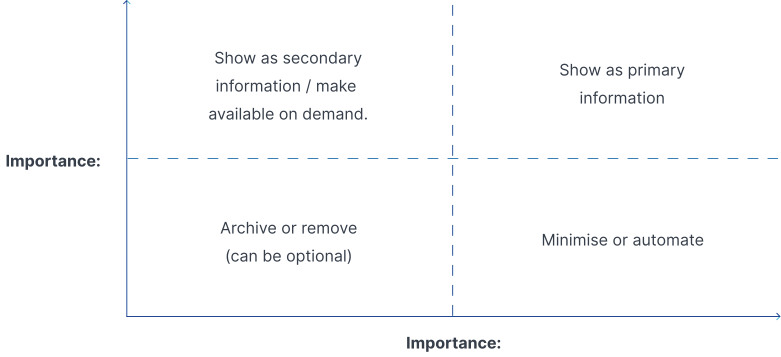

Importance: How essential the information is in accomplishing task or decision? Impact: How information affects overall user workflows?